The health and fitness app market is booming. In 2023, fitness apps were downloaded ~858 million times worldwide, and 81% of consumers planned to use fitness apps on their smartphones or wearables. The industry’s revenue is surging – analysts estimate it will top $19.3 billion in 2023 and reach about $33.0 billion by 2027. Leading apps like MyFitnessPal have tens to hundreds of millions of users (MyFitnessPal alone hit 200 million users by 2023), showing huge demand for nutrition and workout tracking.
If you want to enter this market with your own MyFitnessPal-style app, you need to understand the features, architecture, and development costs involved. This comprehensive guide covers everything from MyFitnessPal’s core capabilities to the tech stack you’ll need, plus realistic cost estimates and FAQs. You’ll learn which features to include, how to design the system, development steps, and how much budget to allocate. Read on to get a full roadmap for creating a fitness & nutrition tracking app that can compete in 2026’s market.
Fitness App Market Overview (2026)
Fitness apps are more popular than ever. A recent industry analysis reports that fitness app installs spiked by 36% in January (New Year’s resolutions) and continue growing year-on-year. Overall industry projections show strong growth: one report estimates $19.3B global revenue in 2023, rising to $33.0B by 2027. ScienceSoft similarly notes the market was $10.59B in 2024 and forecast to triple by 2033. This boom is driven by health consciousness and the convenience of mobile tracking.
Major players dominate the space: MyFitnessPal has ~200M users, Strava ~100M, and Nike’s app millions more. In 2023 alone, users downloaded fitness apps 858 million times worldwide. These figures show there’s room for new, well-designed apps. For example, 81% of people plan to use fitness apps in 2023, indicating a vast potential audience. Users are seeking apps that help them eat healthier, train better, and track progress – an opportunity to capture by building a MyFitnessPal-like app with a strong feature set and great user experience.
MyFitnessPal: The Model Nutrition & Fitness App
Before building your app, study the leader. MyFitnessPal (MFP) is the #1 nutrition-tracking app globally. It offers comprehensive food and exercise tracking plus community features. Key aspects of MyFitnessPal:
Massive Food Database: MFP’s database has 14+ million foods. Users can search, log meals from thousands of restaurants, or even scan barcodes for quick entry. This makes calorie logging easy.
Calorie & Macro Tracking: Users log meals and the app calculates calories, protein, carbs, fats, etc. by the gram. Goals (e.g. lose weight) automatically set daily calorie limits.
Exercise Logging: Users can add workouts or sync wearable devices. The app tracks calories burned and progress over time.
Progress Charts: MFP shows weight and nutritional trends on graphs, helping users visualize progress.
Community and Social: A built-in community lets users add friends, share diaries, and join groups for motivation.
Freemium Model: Basic features (logging food/exercise, viewing basic stats) are free. Advanced features require a subscription. For example, MyFitnessPal Premium+ (annual $99.99, about $8.34/mo) adds:
Ad-Free Experience (no ads)
Nutrient Analysis Tools: See macros by gram, unlimited nutrition reports, and a home dashboard.
Custom Goals: Set calorie/macro goals for each day.
Quick-Add and Voice Logging: Faster ways to add foods.
Meal Scan & Barcode: Advanced logging via camera scan and barcode scanner.
Priority Support & Data Export: Better support and ability to export all your data.
In short, MyFitnessPal’s “free” tier handles basic tracking, and its premium unlocks powerful analytics and convenience tools. A key lesson: start with a robust core feature set that solves users’ main problems, then consider subscription-based extras.
Key Features for Your Fitness App
Your app should include the essentials that users expect from a fitness platform. Here are the main feature areas to plan:
User Profiles & Goals: Allow each user to create a profile (age, height, weight, fitness goals). Let them set targets (weight loss, muscle gain, maintain) and customize daily calorie/macronutrient goals.
Food & Nutrition Logging: The core of a MyFitnessPal clone is meal logging. Users should be able to search a food database (ideally millions of items), manually add foods, and create or import recipes. Include a barcode scanner to quickly log packaged foods. Calculate calories and macros in real time.
Exercise & Activity Tracking: Let users log workouts or sync from fitness devices. Include common exercise types (cardio, strength training), track sets/reps, and calculate calories burned. Integrations with wearables (Fitbit, Apple Watch, etc.) greatly enhance accuracy.
Progress Tracking & Analytics: Show users how they’re doing. Charts for weight, body measurements, calories in vs. out, and macronutrient history keep them motivated. Provide weekly or monthly progress summaries.
Workout Guides & Content: Offer built-in workout routines or video tutorials. Many users appreciate structured programs or even AI-driven custom workout suggestions.
Community & Social Features: Encourage engagement by allowing friends or groups. Features like sharing achievements on social media, joining challenges, or seeing friends’ activities boost retention.
Push Notifications and Reminders: Remind users to log meals or workouts. Adaptive notifications (“Time to log lunch!”) help build habits.
Gamification: Badges, points, streaks, or in-app challenges make the experience fun. For instance, awarding a badge for 7-day logging streak can motivate continued use.
Wearable & Integration Support: Sync with other health platforms (Google Fit, Apple HealthKit) and devices (Garmin, Polar). This seamless data flow is expected by many fitness app users.
Multi-platform Access: Provide mobile apps (iOS/Android) and possibly a web or PWA interface so users can log on any device.
Premium Features (for paid users): Plan for advanced features like detailed nutrient analysis, meal planning, recipe import, voice logging, or AI coaching that can be locked behind a subscription or one-time purchase.
Each feature adds development time, so prioritize wisely. ScienceSoft highlights the most demanded features in 2025: nutrition logging (including barcode scanning), personalized plans and reports, workout and mental health content, social/gamification, and security/billing systems. Use such lists to ensure you cover the essentials.
Designing the User Experience (UI/UX)
A fitness app must be easy and engaging to use, since users log data daily. Keep the interface clean and intuitive:
Streamline Logging: Make it quick to add foods or exercises. For example, save Recent and Favorites entries for one-tap logging (like MFP does). Minimize taps needed.
Clear Data Display: Use charts and progress bars. Show calorie totals and goals prominently. For example, MFP’s diary screen clearly shows calories left for the day.
Motivational UI: Celebrate achievements (e.g. “Congratulations, you hit your goal!”). Use colors and badges to motivate.
Consistent Branding: Use a fitness-themed color scheme and motivational images.
Accessibility: Ensure text is readable, buttons are large enough, and color contrasts meet standards. Offer language localization if targeting global users.
Onboarding & Tutorials: New users should get an easy tutorial or setup wizard to input basic info. Clear tooltips or help guides improve first-time experience.
Remember: good UX increases user retention. Consider A/B testing different designs to see what resonates. Always prototype (even paper sketches) and get user feedback before heavy coding.
Technical Architecture
Behind the scenes, your app will need a robust architecture to handle users and data securely and efficiently. Most modern fitness apps use a multi-layered or microservices architecture. A typical design includes:
Client Layer (Front-End): Mobile apps for iOS and Android (or a cross-platform app) plus optionally a web PWA. This is the user interface. Each app (user, coach, admin) interacts through REST/GraphQL APIs.
API Gateway / Routing Layer: A secure gateway that routes requests from the app to the appropriate backend service. This layer handles authentication and load-balancing.
Backend Microservices: Separate services for each main domain:
User Service: Manages authentication, user profiles, and account settings.
Nutrition Service: Stores the food database and manages meal logs. It handles calorie/nutrient calculations when a user logs a meal (including processing barcodes or recipe parsing).
Workout/Training Service: Contains workout routines and logs exercise sessions. It tracks sets/reps and links to the user’s progress.
Goals/Progress Service: Keeps user goals (weight, macros) and calculates progress (e.g. weekly weight change, goal achievement). Sends reminders or alerts (e.g. “You’re 80% to your step goal”).
Recommendation/AI Service: If you add AI (like meal or workout suggestions), a dedicated service can collect user data and run recommendation algorithms.
Community/Social Service: Handles friends, groups, challenges, feeds.
Payment Service: Manages subscriptions and in-app purchases.
Notification Service: Sends push notifications (reminders, achievements).
Analytics Service: Collects app usage data for insights and improvements.
Each service has its own database (SQL or NoSQL) for its data. For example, the Nutrition service might use a SQL database to store the large food table, while the Workout service might use NoSQL for flexible data. ScienceSoft’s example architecture shows these microservices in containers, each with dedicated responsibility.
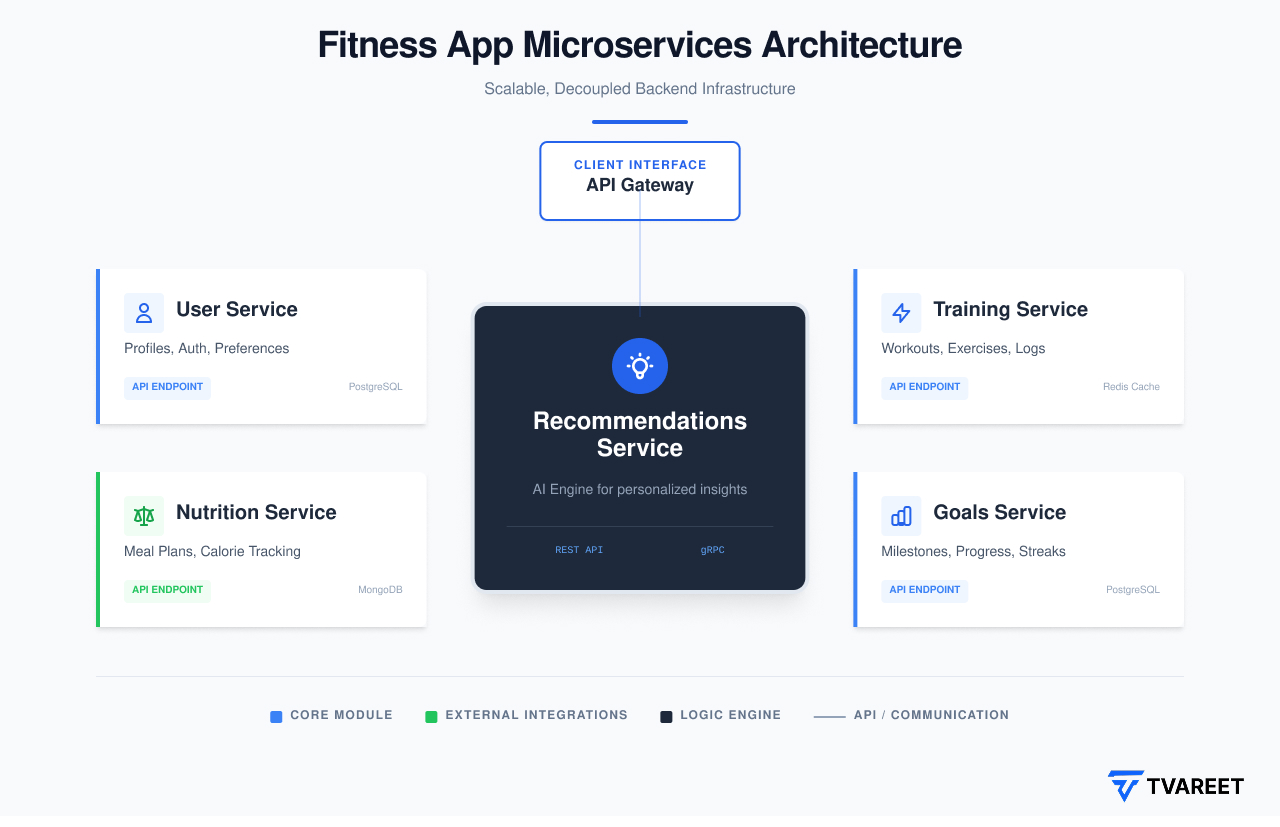
Advantages of this approach: you can scale or update parts independently. For instance, if your Nutrition database grows, you can allocate more resources to that service without touching the Workout service. It also fits agile development: one team can work on the user interface while another builds the backend services.
Technology Stack
Choosing the right technologies is key. Based on MyFitnessPal’s own stack and industry trends, a typical stack might include:
Frontend (Mobile Apps):
Cross-Platform: React Native (JavaScript) or Flutter (Dart) are popular. They allow one codebase for iOS and Android, reducing costs. React Native is mature (used by many enterprises), Flutter has strong performance and UI capabilities.
Or Native: Swift/SwiftUI for iOS and Kotlin for Android. Native apps give maximum performance and device integration (e.g. heart rate sensor APIs), but require maintaining two codebases.
Web App: A Progressive Web App (PWA) can cover browser users. MFP itself offers a web app using PWA technology.
Backend (Server):
Programming Language: Node.js (JavaScript) is a common choice for APIs (and MyFitnessPal uses it). Python (Django/Flask) or Java (Spring Boot) are alternatives. Use what your team knows and what scales well.
Framework: Express (Node.js), Django, or similar web frameworks.
Database: A robust relational database (PostgreSQL/MySQL) for structured data (user profiles, food database). NoSQL (MongoDB) for flexible or semi-structured data (e.g. workout logs, session data).
Caching: Use Redis or Memcached for fast lookup (e.g. recent foods, session tokens).
Cloud & Hosting: Host on AWS, Google Cloud, or Azure for scalability. Services like AWS RDS (managed SQL), S3 (file storage), and Elastic Beanstalk or Kubernetes can help.
CDN & Security: Use a CDN like Cloudflare for static assets and to protect against attacks. MyFitnessPal uses Cloudflare’s bot management and CDN.
APIs & Integrations: Integrate with external APIs – e.g. nutrition databases (USDA API), wearable APIs (Google Fit, Apple HealthKit), payment gateways (Stripe, Apple Pay/Google Pay).
AI/ML: If you plan AI features (personalized diet/workout plans), you might use Python with TensorFlow or PyTorch on the backend.
In short, a proven stack is: React Native + Node.js + PostgreSQL (hosted on AWS). MyFitnessPal’s own stack reportedly includes Node.js and a PWA, so you’ll be on solid ground following similar tech choices.
Security and Compliance
Fitness apps handle personal health data, so security is essential. Key measures include:
Data Encryption: Encrypt sensitive data both in transit (HTTPS/SSL) and at rest (database encryption).
Authentication & Privacy: Use secure authentication (JWT/OAuth). Allow strong passwords and consider biometric login (fingerprint/FaceID). Don’t store raw health data on the device unencrypted.
Regulatory Compliance: If your app handles personal medical information, be aware of laws: HIPAA in the U.S. and GDPR in the EU are big ones. Even if you only have general fitness data, being transparent about data use and getting user consent (especially for tracking/location) is important.
Regular Updates & Audits: As a development best practice, plan for regular security audits and keep dependencies up-to-date to patch vulnerabilities.
As one expert notes, “If security is an afterthought and it isn’t made a priority during development, the consequences are even more costly”. So build security into your development lifecycle from day one.
Development Roadmap
Building your app is a multi-step process. A common roadmap:
Market Research: Identify your niche. Who is your target user (e.g. “busy professionals tracking calories”)? Analyze competitors (beyond MyFitnessPal – e.g. Lose It!, Cronometer, Strava, Fitbit). List their strengths/weaknesses. Look for feature gaps you can fill.
Define MVP (Minimum Viable Product): Decide on the core features for version 1. Typically: user accounts, food logging, calorie/macro calculation, basic activity tracking, and progress display. Keep it simple enough to build quickly (3–4 months for an MVP).
UX Design: Create wireframes and prototypes. Map out user flows (e.g. “Add Meal” flow, “View Progress” screen). Focus on ease-of-use. Get feedback on your prototype before coding.
Development:
Platform: Choose native or cross-platform. For faster launch and budget, cross-platform frameworks like React Native or Flutter are common – they let you cover iOS and Android with one codebase. (Stormotion notes native apps cost significantly more than cross-platform.)
Backend Setup: Implement your microservices or API endpoints. Set up databases and server environments. Use cloud services and continuous integration for smooth deployment.
Frontend Implementation: Build the mobile app UI and connect it to the backend. Implement local storage for offline support (so users can log on the go).
Third-Party Services: Integrate necessary APIs (nutrition database API, authentication, maps for GPS, etc).
Testing & QA: Thoroughly test on multiple devices and scenarios. Test all features: logging, notifications, purchases, etc. Use unit tests, beta tests (via TestFlight or Google Play beta). Fix bugs.
Launch: Prepare app store listings (Apple App Store, Google Play). Follow their guidelines (weigh in-app purchase vs external web purchase to comply with policies). Plan marketing (blogs, social media, press) around launch.
Post-Launch & Iteration: Collect user feedback and analytics. Add new features iteratively (diet plans, AI coaching, social sharing, etc). Keep improving performance and UX.
This iterative approach (sometimes called agile development) helps control costs and adapt to user needs. Many companies also use white-label platforms to speed up launch (e.g. Appscrip’s solutions can launch in ~60 days). But custom development gives maximum flexibility.
Cost to Build a Fitness App
Budgeting for your app requires understanding how features and complexity drive cost. Industry estimates are broad but instructive. In general:
A basic fitness app MVP (core tracking features, one platform) can cost around $30,000–$60,000. This includes user accounts, simple nutrition logging, basic exercise logging, and progress charts.
A medium-complexity app (adding features like video workouts, social sharing, more robust UI) might range $60,000–$150,000.
A full-featured app with AI personalization, live coaching, AR/VR, extensive social/gamification, and multi-platform support can easily cost $150,000–$300,000+. One guide notes advanced fitness platforms with AI and streaming may exceed $200k.
Costs vary by region: developers in North America/Europe charge more than those in Asia. Expect an average hourly rate of $40–$100+ depending on location and expertise.
Examples by App Type
Different fitness app categories have different average costs (from an Oct 2025 analysis):
Personal Training/Workout Apps:
Basic (AI coaching, workouts, tracking): $40k–$90k.
Advanced (real-time coaching, interactive challenges): $90k–$150k+.
Activity & Fitness Tracking Apps:
Basic (steps, heart rate, calories): $35k–$70k.
Advanced (wearable data sync, social sharing, analytics): $70k–$120k.
Diet & Nutrition Apps:
Basic (calorie counter, meal log): $30k–$60k.
Advanced (AI diet plans, complex food DB): $60k–$100k.
Yoga/Meditation Apps:
Basic (guided sessions, timers): $20k–$45k.
Premium (video libraries, personalized routines): $45k–$70k.
Hybrid AI-powered Platforms:
Mid-tier (combined workouts, nutrition, mindfulness): $80k–$150k.
Top-end (full gamification, AI recommendations, extensive content): $150k–$250k+.
These ranges overlap with general figures (e.g. $30k-$70k for MVP to $300k+ for advanced). For instance, one source notes “fitness app development costs range from $30,000 for a basic MVP to $300,000+ for advanced platforms”. Budget carefully according to your feature list.
Hourly & Time Estimates
To break this down further, consider estimated development hours. One analysis lists about 830–1,110 hours to build a full fitness app with features like push notifications, video guides, exercise planning, nutrition tools, and more. At an average rate of ~$40/hr, that’s $33k–$44k just for development time. Additional hours will be needed for project management, design, and QA.
In practice, a typical timeline is:
MVP (basic): ~3–4 months of development, costing ~$30k–$60k.
Full launch: ~6–12 months, costing $100k+.
Using cross-platform development can significantly shorten time. For example, React Native often cuts development time by 30–40% compared to separate native apps. Stormotion notes cross-platform builds are generally cheaper ($35k–$100k) vs native ($40k–$120k) for a complete app.
Factors Affecting Cost
Your final cost will depend on many factors:
Features & Complexity: Every feature (e.g. barcode scanner, AI coaching, video streaming, social network) adds development time.
Platforms: Developing for two platforms doubles work unless you use cross-platform. A single-platform app (iOS or Android) can save ~30–40% cost.
Design & UX: Custom, high-quality animations and UI/UX will increase design costs (often $10k–$30k or more).
Backend Infrastructure: The number of servers/microservices needed (e.g. scaling for 1M users) influences cloud hosting costs.
Third-party Integrations: Integrating APIs (wearables, payment processors, nutrition databases) adds extra dev time.
Development Team: Rates vary by region. In-house teams or top US agencies may charge $100+/hr, while reputable Eastern Europe/Asia teams might charge $30–$50/hr.
Maintenance: After launch, plan for ongoing costs (~15-20% of initial dev cost per year) for updates, bug fixes, and new OS compatibility.
In summary, plan a tiered budget: start with $30k–$50k for a pilot MVP, and be prepared to invest more ($100k+) as you add advanced features and scale up.
Native vs Cross-Platform: Pros and Cons
One of the biggest decisions is how to build the app(s). You have three main options:
Native Development: Build separate apps for iOS (Swift/Objective-C) and Android (Kotlin/Java). Pros: Best performance, full access to device hardware (e.g. sensors, complex animations), adherence to each platform’s UX conventions. Cons: Double the work (two codebases), higher cost and longer timeline.
Cross-Platform (React Native/Flutter): Build one app that runs on both iOS and Android. Pros: Significantly faster and cheaper development (studies show ~30–40% time/cost savings). A single team/codebase handles both platforms. Cons: Slight limitations in accessing some native features (though React Native and Flutter cover most use-cases), and slightly larger app size/performance overhead compared to pure native.
Progressive Web App (PWA): A web app that behaves like a native app in the browser. Pros: Lowest cost, instant updates, no app store approvals. Cons: Lacks deep hardware access (limited sensor support), no app-store presence (less visibility), and poorer offline support. Generally only used for simpler fitness apps or as a complement to native.
If you want to launch quickly and control costs, a cross-platform approach is often best. For example, one analysis cites native development costing ~$15k–$21k (presumably per platform) vs ~$3k–$5k for a cross-platform MVP. More importantly, another source notes that using React Native or Flutter can reduce development time by 30–40% and costs by up to 35% compared to native. The embedded diagram below illustrates the idea:
Cross-platform frameworks (e.g. React Native, Flutter) let you build one app for both iOS and Android, often reducing development time by ~30–40%.
However, if your app requires heavy real-time data (e.g. live video workouts or very complex animations), native might offer slightly smoother performance. Also, some companies prefer a native app’s tighter integration with the OS (like workout tracking using background location). Consider your priorities: speed and budget (cross-platform) versus maximum performance (native).
Security, Compliance, and Privacy
When building a fitness app, security is not optional:
Encryption: Always use HTTPS for data transfer. Encrypt sensitive data (health metrics, personal info) in your databases.
Authentication: Implement secure login (OAuth 2.0 or JWT tokens). Offer strong password rules and optional two-factor or biometric login for extra security.
Data Privacy: Be transparent about data use. If you handle health or medical data, you may need to comply with HIPAA (USA) or GDPR (EU). Even if you’re tracking fitness (not medical), get user consent for any health-related data collection.
Regular Updates: Fix security vulnerabilities promptly. Use automated tools to scan dependencies for threats.
Failing to secure user data can ruin trust. ScienceSoft emphasizes modules like secure cloud storage and data encryption as essential. Treat user privacy as a key feature – people are sensitive about health data.
Monetization Strategies
MyFitnessPal thrives on subscriptions, but you have multiple options:
Freemium Subscription: Offer core features free, and charge for premium content (detailed analytics, recipes, advanced planning). MyFitnessPal Premium costs about $79.99/year ($6.67/mo) or Premium+ is $99.99/yr. Business reports suggest successful fitness apps price premium tiers around $10–$15/month.
Ads & Sponsorships: Include non-intrusive ads in the free version (carefully, since too many ads can annoy users). You might partner with fitness brands (gym equipment, supplements) for sponsored content.
In-App Purchases: Sell one-off features (e.g. extra workout pack), or in-app currency for gamification.
Affiliate Sales: Recommend fitness products or meal plans and earn affiliate fees.
B2B / Corporate: Offer white-label versions or enterprise plans to gyms and health programs. Corporate wellness programs often pay for custom fitness platforms.
In practice, a combination works best. For example, Appscrip’s blog notes subscription is the most predictable model (most successful apps use it), while free trials or basic versions attract users and convert them to paid plans.
Hiring Options: In-House vs Outsourcing
Who builds the app also impacts cost and timeline:
In-House Team: Hiring your own developers, designers, and managers means full control and constant collaboration. However, it’s expensive (salaries, benefits) and takes time to hire.
Outsourcing / Development Agency: Many startups go this route. Agencies often have pre-vetted teams and can ramp up quickly. Costs vary by location (Eastern Europe or Asia agencies are usually less expensive than Silicon Valley firms). The trade-off is slightly less direct control and potential communication lags, but a good agency will manage the process and deliver quality.
Freelancers: Hiring freelancers for specific tasks (UI design, a feature, testing) can save money for small projects. But managing freelancers requires effort, and quality can vary.
Typical advice: If your project is complex and large-scale, an experienced agency is safest. For a small MVP, freelancers or a small team might suffice. Always check portfolios and reviews. Clear communication (specs, deadlines) is key whichever route you choose.
Tips for Success
Building the app is half the battle; growth and engagement are the other half. Keep these in mind:
Focus on Core Value: Solve a real problem simply. For example, focus on intuitive food logging or unique workout plans.
User Engagement: Use push notifications and email campaigns to re-engage dormant users. Seasonal campaigns (New Year fitness push) can boost sign-ups.
Quality Content: Whether workouts, recipes, or tips, high-quality content keeps users coming back. Consider partnering with fitness experts or nutritionists.
Community Building: Promote the social aspect: add “Invite a friend” features, in-app community challenges, or integration with social media.
Regular Updates: The app ecosystem is competitive. Continuously add improvements and listen to feedback. Frequent updates (bug fixes, new features) increase user trust.
SEO & Marketing: Optimize your app store listing with keywords (“fitness app”, “calorie tracker”, “gym workout app”). Write a blog (like this one!) to capture search traffic from people asking how to build or compare fitness apps. Provide useful information and link back to your app (call to action: “Download our demo” or “Get a free quote”).
By treating your fitness app like a product, not just a project, you’ll maximize its chances of success.
Cost Recap & Examples
To recap the cost discussion with some examples:
A basic fitness app with core logging, simple UI, and one platform might start around $30,000–$50,000.
Adding content-rich features (video workouts, social, multilingual support) could push the budget above $100,000.
Advanced “clone” apps (think MyFitnessPal level: huge food database, barcode scanning, AI planning) often cost $150,000+.
In terms of hours, expect hundreds of developer-hours. For example, one breakdown totaled 830–1,110 hours (approx $33k–$44k) for a robust fitness app. If you double that for design/management and quality assurance, the number climbs quickly.
Timeframe: allow 3–6 months for an MVP, and 6–12 months for a polished multi-platform launch.
These are ballpark figures; get a detailed quote from developers for accuracy.
Marketing early (even before launch) can build anticipation. Use social media, fitness influencers, or email campaigns to collect leads.
FAQs
1. How much does it cost to develop a fitness app?
Costs vary widely by features and complexity. A basic MVP might be $30k–$60k, while an advanced fitness platform can exceed $200k. One guide estimates a basic fitness app at $30k, and a fully-featured platform at $300k+. Factors like AI integration, live coaching, or multi-device sync raise the price. Always get a quote based on your exact feature set.
2. What features should my fitness app include?
At minimum: user accounts, food/calorie logging, workout/exercise tracking, and goal tracking with charts. Additional must-haves include barcode scanning for foods, progress reports, and custom goals by day. Other valuable features: workout libraries, community challenges, wearable integration, and push reminders. Advanced apps also offer meal plans or AI coaching.
3. Native or cross-platform development – which is better?
It depends on your priorities. Native apps (Swift/Kotlin) give the best performance and device integration, but require two teams (iOS and Android) and cost more. Cross-platform (React Native/Flutter) lets you develop once for both platforms, usually saving ~30–40% in time and cost. For most startups, cross-platform hits the sweet spot of performance vs budget. A PWA (web app) is cheapest but lacks some mobile features.
4. What tech stack should I use?
A common modern stack: Frontend: React Native or Flutter for mobile (optionally a PWA for web). Backend: Node.js (JavaScript) or Python for APIs, with a SQL database (PostgreSQL or MySQL) for data. Use cloud services (AWS/GCP) for hosting and a CDN like Cloudflare for speed. For advanced features, consider Python (TensorFlow) for AI, and standard tools like Firebase for push notifications. MyFitnessPal itself uses Node.js and a PWA, which is a solid reference.
5. How long does it take to build a fitness app?
Timelines vary. A simple MVP can be done in about 3–4 months. A full-featured app usually takes 6–12 months, factoring design, development, testing, and app store approval. Using a pre-built solution or template can shorten this (some white-label fitness platforms launch in under 60 days).
6. How can I make money from a fitness app?
The most proven model is subscriptions. For example, MyFitnessPal charges around $8–$10/month for premium features. Advertising (for free users) and affiliate sales (e.g. supplements) are other options. Some apps sell related products or charge commissions on trainer bookings. In any case, a free trial or freemium approach (free core, paid extras) is common in this industry.
7. Do I need to comply with health regulations?
If your app deals with personal health data or claims (like “lose weight fast”), be cautious. In most countries, calorie counting and fitness apps aren’t regulated as medical devices, but if you handle sensitive health info (like medical records or diagnostic advice), you may need HIPAA, GDPR, or even FDA approval for medical claims. At minimum, have a clear privacy policy and get user consent for data collection.
Conclusion & Next Step
Building a fitness app like MyFitnessPal is a challenging but rewarding project. The demand is there – 81% of people want fitness apps, and the market is growing rapidly. By focusing on key features (easy meal logging, accurate tracking, motivational analytics), using a solid tech stack (React Native/Node.js or similar), and budgeting realistically, you can create a competitive fitness app.